Client details
{{company}} and {{project}} are replaced with values from your JSON.
For software and automation agencies
Keep the proposal in Word. Send client details and line items as JSON. Get a PDF for your existing workflow.
All example files are free to download. No signup needed to explore.
A complete example
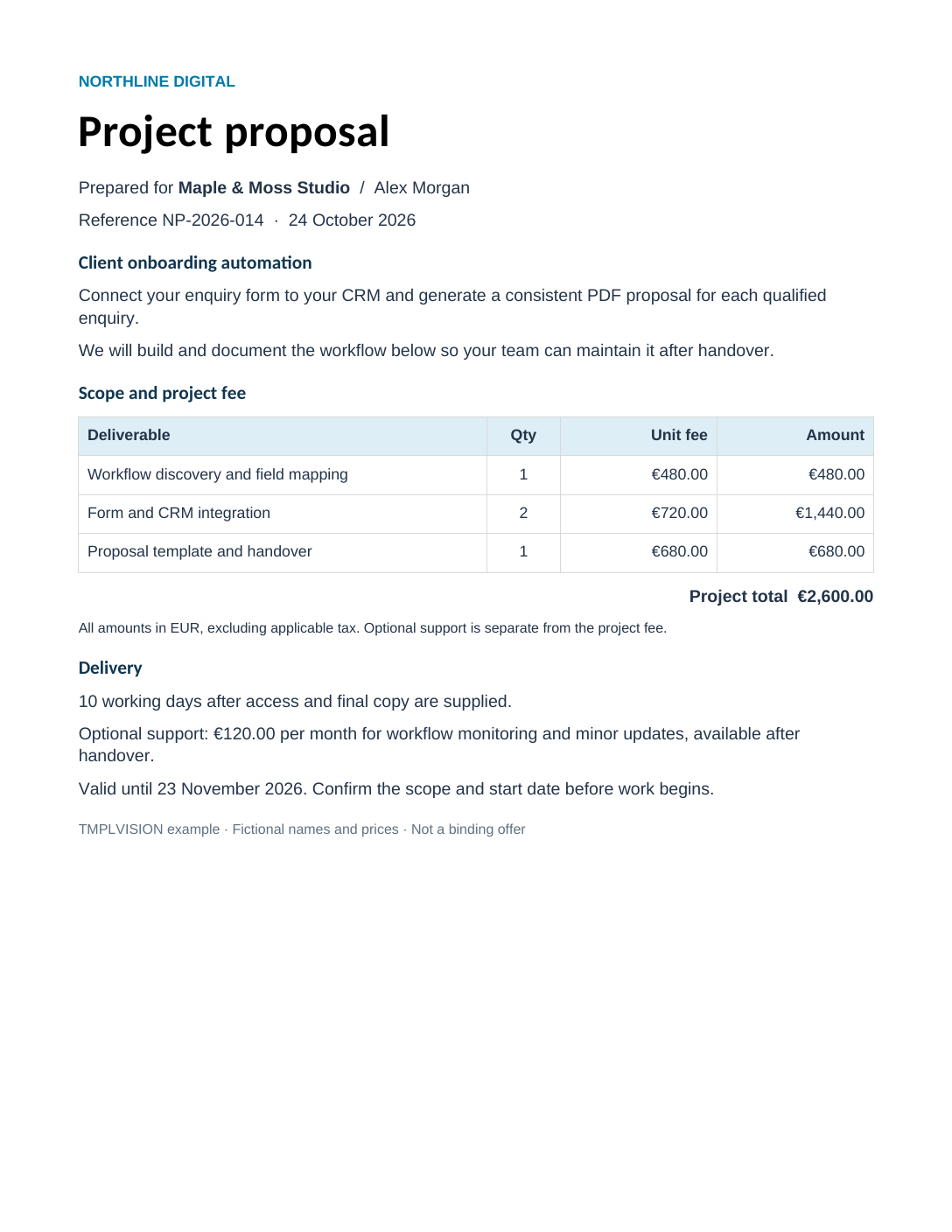
A fictional agency quotes a client onboarding project. Compare what changes when you edit the data or the Word document.
Three line items, a €2,600 project total and an optional €120/month support section.
One editable Word template plus the sample JSON produces this PDF.
{
  "reference": "NP-2026-014",
  "issued": "24 October 2026",
  "validUntil": "23 November 2026",
  "company": "Maple & Moss Studio",
  "contact": "Alex Morgan",
  "project": "Client onboarding automation",
  "summary": "Connect your enquiry form to your CRM and generate a consistent PDF proposal for each qualified enquiry.",
  "items": [
    {
      "description": "Workflow discovery and field mapping",
      "qty": 1,
      "rate": "€480.00",
      "amount": "€480.00"
    },
    {
      "description": "Form and CRM integration",
      "qty": 2,
      "rate": "€720.00",
      "amount": "€1,440.00"
    },
    {
      "description": "Proposal template and handover",
      "qty": 1,
      "rate": "€680.00",
      "amount": "€680.00"
    }
  ],
  "total": "€2,600.00",
  "delivery": "10 working days after access and final copy are supplied.",
  "support": true,
  "supportFee": "€120.00"
}
These are pre-generated examples from TmplVision. Selecting a variation shows its saved output; it does not submit a live API request.
Your client keeps control of the document
Keep your branding and ordinary text in the document. Mark the parts that change for each client.
{{company}} and {{project}} are replaced with values from your JSON.
The row starts with {{#each items}} in its first cell and ends with {{/each}} in its last. Each item becomes a complete row.
{{#if support}} wraps the support paragraph. Set support to false to hide it.
Your application supplies prices and the total. This example uses preformatted EUR amounts; TmplVision does not calculate the quote. Check fonts and pagination with your own documents before sending them to clients.
Reproduce the result
Start with the original template and data, then replace the fictional details with your own.
Requires Node.js 22 or newer. Save these two files in one folder:
export TMPLVISION_API_TOKEN='YOUR_API_TOKEN'
export TMPLVISION_TEMPLATE_ID='YOUR_TEMPLATE_ID'
export TMPLVISION_REGION='eu'
node generate-proposal.cjs$env:TMPLVISION_API_TOKEN='YOUR_API_TOKEN'
$env:TMPLVISION_TEMPLATE_ID='YOUR_TEMPLATE_ID'
$env:TMPLVISION_REGION='eu'
node generate-proposal.cjsUse us for a US account. The script saves proposal.pdf. Pass a different JSON filename to try another set of values.
Import the workflow, set your template ID in Proposal data, and select a Header Auth credential in Generate proposal PDF.
x-apitokenFor a US account, change the request host to us.api.tmplvision.io. Run the workflow manually; the PDF appears in the final node's binary output under data.
Uses n8n's standard HTTP Request node. You add your own credentials after importing. The workflow runs only when you trigger it.
Replace the sample template with your own Word document. Test the result before connecting it to your form, CRM or automation.